The Blog Rollup Web Part displays the most recent Blog posts of each Blog within the Sharepoint Site collection and thus gives much better visibility to new blog posts published anywhere within the current site collection.
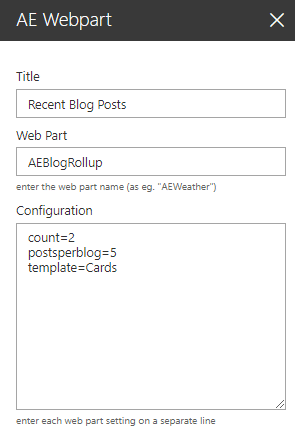
Web Part Configuration:
Title: enter the optional web part title
Web Part: AEBlogRollup
Configuration: enter the below configuration options:
count=2 (defines the number of posts to be displayed) more=16 (defines the number of words displayed per post) readmore=16 (text to be displayed for the Details link) postsperblog=5 (defines the number of posts per blog) template=cards (chooses the "Cards" layout option) site=url (optionally specify the site collection URL to be rolled up) blogs=blogurl (specify one or more specific blogs to be included) category=category name (filter by blog category) subsitesonly=1 (only roll up the current site and its subsites) showdate=1 (display the post date) showcategory (display the blog post category) showphoto=1 (display the post author's photo) showauthor=1 (display the post author's name) showcomments=0 (suppress the number of comments) showpresence=1 (suppress the presence indicators) showblogname=1 (display the blog's name) subsitesonly=1 (roll up the current site and its subsites only) filter=Filter expression (optionally enter a property filter) cache=60 (specify the cache duration in minutes)