Task Rollup Web Part

The Task Rollup Web Part displays the tasks defined in each Task List within the Sharepoint Site collection(s) and thus gives much better visibility to new or pending tasks created anywhere within the current site collection(s).
The Task Roll Up Web Part allows to filter the results by any column, the current date and the currently logged-in user.

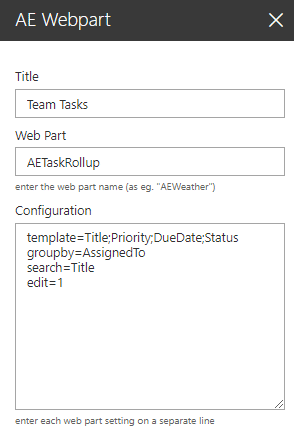
Web Part Configuration:


Title:
enter the optional web part title

Web Part:
AETaskRollup

Configuration:
enter the below configuration options:

template=Title,etc. (define the list columns to be displayed)
search=Title (optionally define the search fields)
groupby=AssignedTo (optionally define a "group by" column)
filter=filter expression (optionally define a "filter" expression)
includelists=https://xxx (restrict results to the specified lists)
footer=some text (optionally add a web part footer text)
edit=1 (display the "Edit" form as opposed to the "View" form)
subsitesonly=1 (roll up current site and its subsites)
max=10 (enter the desired page size)
sortby=column name (sort results by the speified column)
cache=60 (enter the desired cache duration in minutes)


Webpart Homepage & Download »