Navigator Web Part

The Navigator Menu Web Part allows to easily set up a menu with icons or images based on a Sharepoint List.

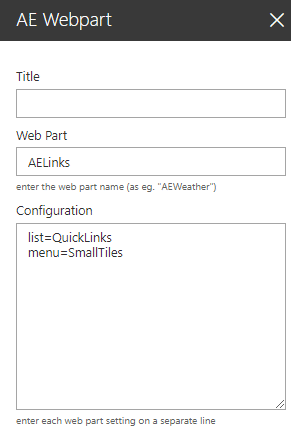
Web Part Configuration:


Title:
enter the optional web part title

Web Part:
AELinks

Configuration:
enter the below configuration options:

site=SiteUrl (optionally enter a site URL)
list=QuickLinks (enter the name of the Links list)
view=SomeView (optionally enter the name of the list view)
menu=SmallTiles (select one of the available menu layouts)
icon=Left (optionally select one of the icon layouts)
hierarchy=Folder,View or Column (select the top level hierarchy)
edit=yes (enable in-place link editing)
menucss=some CSS (styles applied to the web part container)
itemcss=some CSS (styles applied to the menu items)
sectioncss=some CSS (styles applied to the menu sections)
columns=4 (set the number of columns)
hovercolor=cyan (define the item hover color)
header=some text (define the optonal header)
footer=some text (define the optonal footer)


Webpart Homepage & Download »