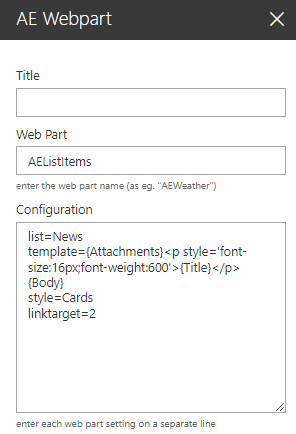
The List Items Web Part reads the entries from a Sharepoint List or Library (located anywhere in the site collection or web application). It displays the selected fields using a freely configurable template
Web Part Configuration:
Title: enter the optional web part title
Web Part: AEListItems
Configuration: enter the below configuration options:
site=SiteUrl (optionally enter a site URL) list=TeamCalendar (enter the name of the Sharepoint list) view=SomeView (optionally enter the name of the list view) template=enter the column names enclosed in curly braces to be displayed including any HTML tags items=enter the number of items to be displayed css=optionally enter the CSS style to be applied to each item wpcss=optionally enter the CSS style to be applied to the web part linktarget=2 (specify how to open the linked items) pagesize=10 (enable paging and set the page size) style=Cards (optionally select one of the available layout styles) header=Cards (enter an optional header text) footer=some footer text (enter an optional footer text) searchbox=Field name(s) (enter one or more list columns)