Web Part Configuration
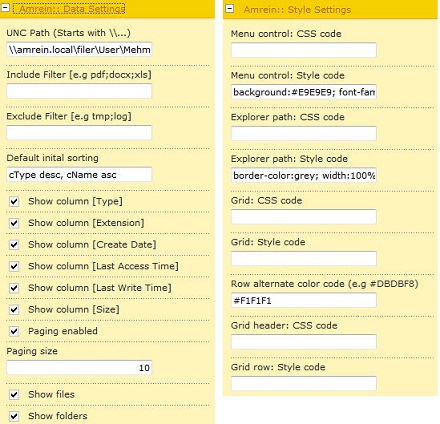
Amrein :: Data Settings
UNC Path: Only UNC path are allowed beginning with \\servername\sharename
Include Filter: Include all the required file extensions in the grid view
Exclude Filter: Exclude all the required file extensions in the grid view
Default initial sorting: List column for the initial sorting
Show column [..]: Enable or disable columns
- Following columns are available:
[cType] : Displays file or folder icon
[cExtension]: Displays file extension
[cName]: Displays the file or folder name
[cCreateDate]: Created date and time
[cLastAccessTime]: Last access date and time
[cLastWriteTime]: Last write date and time
[cSize]: Shows the size of files in KB, MB, GB
Paging: Enable/ Disable paging in the grid results
Paging size: Set the number of entries to show up in the results
Show files: Display files in the result set
Show folders: Display folders in the result set
Amrein :: Style Settings
For the style settings you can enter the CSS Code (refers to your custom stylesheet or to your standard SharePoint style sheet core.css) or enter the Style Code manually.
Example CSS Code:
ms-viewheadertr
Example Style Code:
background:#E9E9E9; font-family:Verdana; border-style:none; border-color:#E9E9E9; width:100%; text-align:left; vertical-align:top; |