Sharepoint Web Parts 
Digital Clock Web Part
Stock Chart Web Part
Stock Quotes Web Part
Quote of the Day Web Part
"Spotlight On.." Web Part
"Tip of the Day" Web Part
Lightbox Web Part
Weather Web Part
Slideshow Web Part
Currency Rates Web Part
Media Player Web Part
YouTube Player Web Part
Org Chart Web Part
Tiles Web Part
Hero Web Part
Bullet Graph Web Part
RSS Feed Ticker Web Part
SQL Viewer Web Part
Google Map Web Part
Quick Poll Web Part
Quick Survey Web Part
Audio Player Web Part
Google GeoMapper Web Part
SQL Chart Web Part
Exchange Calendar Web Part
Podcast Web Part
Filter Web Part
Image Rotator Web Part
Navigator Web Part
KPI Web Part
Page Hits Web Part
Picture Menu Web Part
Timer Web Part
SQL Bullet Graph Web Part
User Spotlight Web Part
List View Web Part
Staff Directory Web Part
Birthday Reminder Web Part
News Carousel Web Part
Team Members Web Part
Classifieds Web Part
Image Menu Carousel Web Part
Timeline Web Part
Banner Rotator Web Part
AZ Index Web Part
Blog Roll Up Web Part
Discussion Roll Up Web Part
Document Roll Up Web Part
News Roll Up Web Part
Task Roll Up Web Part
Calendar Roll Up Web Part
Quick Form Web Part
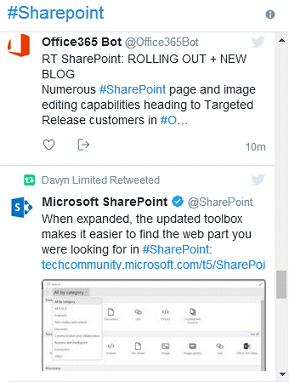
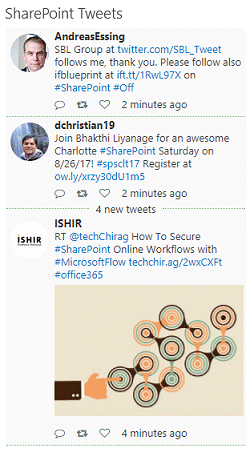
Twitter Web Part
Upcoming Events Web Part
Welcome Web Part
Color Calendar Web Part
Image Carousel Web Part
List Rotator Web Part
List Search Web Part
Web Part Support
Web Part Bundle
|
Microsoft Sharepoint Web Parts
Free Sharepoint Twitter Web Part
Important Note:
On June 12, 2013 Twitter switched to its new API V1.1 which causes the previous versions of both the Twitter Widget and the Twitter Enterprise web part to cease working.
We have released a new version of both web parts which now use the new Twitter API.
If you are using a 1.x web part version, please re-download the Zip package, extract the WSP file and then update the web part solution.
Installation Instructions:
- download the Twitter Web Part Installation Instructions (PDF file, see above)
- download and unpack the AETwitterWebpartV2.zip file.
The ZIP archive contains the AETwitterWebpart.wsp, the AETwitterWebpart.dll and the AETwitter.webpart files.
- deploy the feature to your server/farm as described in the instructions.
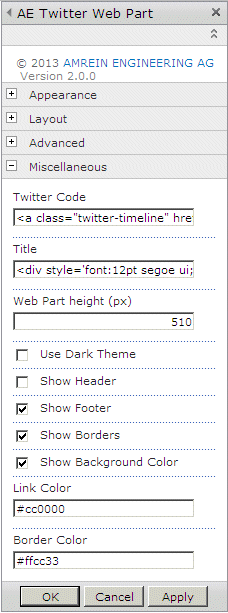
- Configure the following Web Part properties in the Web Part Editor "Miscellaneous" pane section as described in the Installation Instructions PDF file.
|
|
Technical Support Contact Information
If you find that you cannot resolve an issue using the above tools, our Technical Support staff will be ready to handle your technical support needs. You can reach our staff by phone or by email.
Phone: +41 (0)62 823 75 75 (9am - 5pm GMT)
Fax : +41 (0)62 823 75 74
Email: [email protected]
© 2026 AMREIN ENGINEERING AG
|

 Both the web parts we have purchased are simple to install & use and work well. Customer support is excellent! Thank-you Both the web parts we have purchased are simple to install & use and work well. Customer support is excellent! Thank-you
 Angie Guile, Vela VKE
|




 Twitter Widget Installation Instructions (WSS3/MOSS2007)