Sharepoint Web Parts 
Digital Clock Web Part
Stock Chart Web Part
Stock Quotes Web Part
Quote of the Day Web Part
"Spotlight On.." Web Part
"Tip of the Day" Web Part
Lightbox Web Part
Weather Web Part
Slideshow Web Part
Currency Rates Web Part
Media Player Web Part
YouTube Player Web Part
Org Chart Web Part
Tiles Web Part
Hero Web Part
Bullet Graph Web Part
RSS Feed Ticker Web Part
SQL Viewer Web Part
Google Map Web Part
Quick Poll Web Part
Quick Survey Web Part
Audio Player Web Part
Google GeoMapper Web Part
SQL Chart Web Part
Exchange Calendar Web Part
Podcast Web Part
Filter Web Part
Image Rotator Web Part
Navigator Web Part
KPI Web Part
Page Hits Web Part
Picture Menu Web Part
Timer Web Part
SQL Bullet Graph Web Part
User Spotlight Web Part
List View Web Part
Staff Directory Web Part
Birthday Reminder Web Part
News Carousel Web Part
Team Members Web Part
Classifieds Web Part
Image Menu Carousel Web Part
Timeline Web Part
Banner Rotator Web Part
AZ Index Web Part
Blog Roll Up Web Part
Discussion Roll Up Web Part
Document Roll Up Web Part
News Roll Up Web Part
Task Roll Up Web Part
Calendar Roll Up Web Part
Quick Form Web Part
Twitter Web Part
Upcoming Events Web Part
Welcome Web Part
Color Calendar Web Part
Image Carousel Web Part
List Rotator Web Part
List Search Web Part
Web Part Support
Web Part Bundle
|
Microsoft Sharepoint Web Parts
Free Sharepoint Welcome Web Part
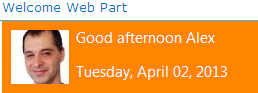
The Welcome Web Part welcomes users to your portal by displaying a personal message that includes the user's name and photo. It allows to display a standard message which changes depending on the time of day. You can configure the custom greeting messages, the language, choose different ways to display the user name and change the style of the welcome box.
The Web Part can be used with Windows Sharepoint Services V3, MOSS 2007, Sharepoint 2010, Sharepoint 2013 and Sharepoint 2016.
The following parameters can be configured:
- Template to customize the welcome message
- several placeholders to dynamically add context-sensitive information
- CSS styles
- Language localization
| Product |
Price |
|
Welcome Web Part for SP 2007 and 2010
|
Free |
 |
Welcome Web Part for SP 2013
|
Free |
|
Welcome Web Part for SP 2016
|
Free |
|
Welcome Web Part
Sandbox Version (on premise only)
|
Free |
|
 Web Part Installation Instructions Web Part Installation Instructions |
|
| |
 | |
Installation Instructions:
- download the Welcome Web Part Installation Instructions (PDF file, see above)
- download and unpack the AEWelcomeWebpart.zip file.
The ZIP archive contains the AEWelcomeWebpart.wsp, the AEWelcomeWebpart.dll and the AEWelcome.webpart files.
- either install the web part manually or deploy the feature to your server/farm as described in the instructions.
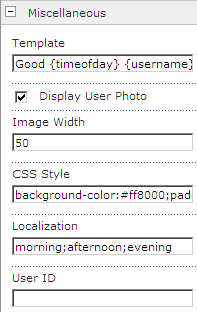
- Configure the following Web Part properties in the Web Part Editor "Miscellaneous" pane section as needed:
- Template: Enter the text and placeholder(s) to compose the welcome message.
Default setting:
Good {timeofday} {username}
| Placeholders |
| Current time of day |
{timeofday} |
| User's local time of day |
{localtimeofday} |
| Current Date |
{date} |
| Current Time |
{time} |
| Username |
{username} |
| User account name |
{accountname} |
| User's mail |
{usermail} |
| User Login name |
{uid} |
| Site Title |
{site} |
| Page Title |
{page} |
| User Photo |
{picture} |
| First Name |
{firstname} |
| Last Name |
{lastname} |
| Department |
{department} |
| Job Title |
{jobtitle} |
| Notes |
{notes} |
| Work Phone |
{workphone} |
| Office |
{office} |
| Full Name |
{fullname} |
| User's Web Site |
{website} |
| SIP Address |
{sipaddress} |
| Mobile Phone |
{mobilephone} |
| Responsibilities |
{responsibility} |
| Site Administrators |
{siteadmins} |
| Site Collection Administrator |
{sitecollectionadmin} |
| IP Address |
{ip} |
- Display User Photo: optionally show the user's profile photo
- Image Width: enter the user photo width in pixels (leave empty to use the default width)
- CSS Style: enter the optional CSS style(s) to be used for the box and the text.
- Localization: Enter the localized strings for the following 3 words:
- morning
- afternoon
- evening
- User ID: optionally enter the account name of a specific Sharepoint user. Leave empty to refer to the current user.
|
|
Technical Support Contact Information
If you find that you cannot resolve an issue using the above tools, our Technical Support staff will be ready to handle your technical support needs. You can reach our staff by phone or by email.
Phone: +41 (0)62 823 75 75 (9am - 5pm GMT)
Fax : +41 (0)62 823 75 74
Email: [email protected]
© 2026 AMREIN ENGINEERING AG
|

 This is one of the best development studios I have ever had the pleasure to work with. AE has been a top referral of my company ever since we started working with SharePoint. Our clients are always happy with them. Their support is one of the best I had. This is one of the best development studios I have ever had the pleasure to work with. AE has been a top referral of my company ever since we started working with SharePoint. Our clients are always happy with them. Their support is one of the best I had. Steven Monczka, Cal Net Technology Group
|